

Escape The Room 4 Colors Metal Button Props Press Buttons in Order or in The Same Time to Unlock Control 12V Magnet Lock for Exit Room Game (with Audio, 11 Metal Buttons)
Product details
| Management number | 209888422 | Release Date | 2026/04/02 | List Price | US$96.00 | Model Number | 209888422 | ||
|---|---|---|---|---|---|---|---|---|---|
| Category | |||||||||
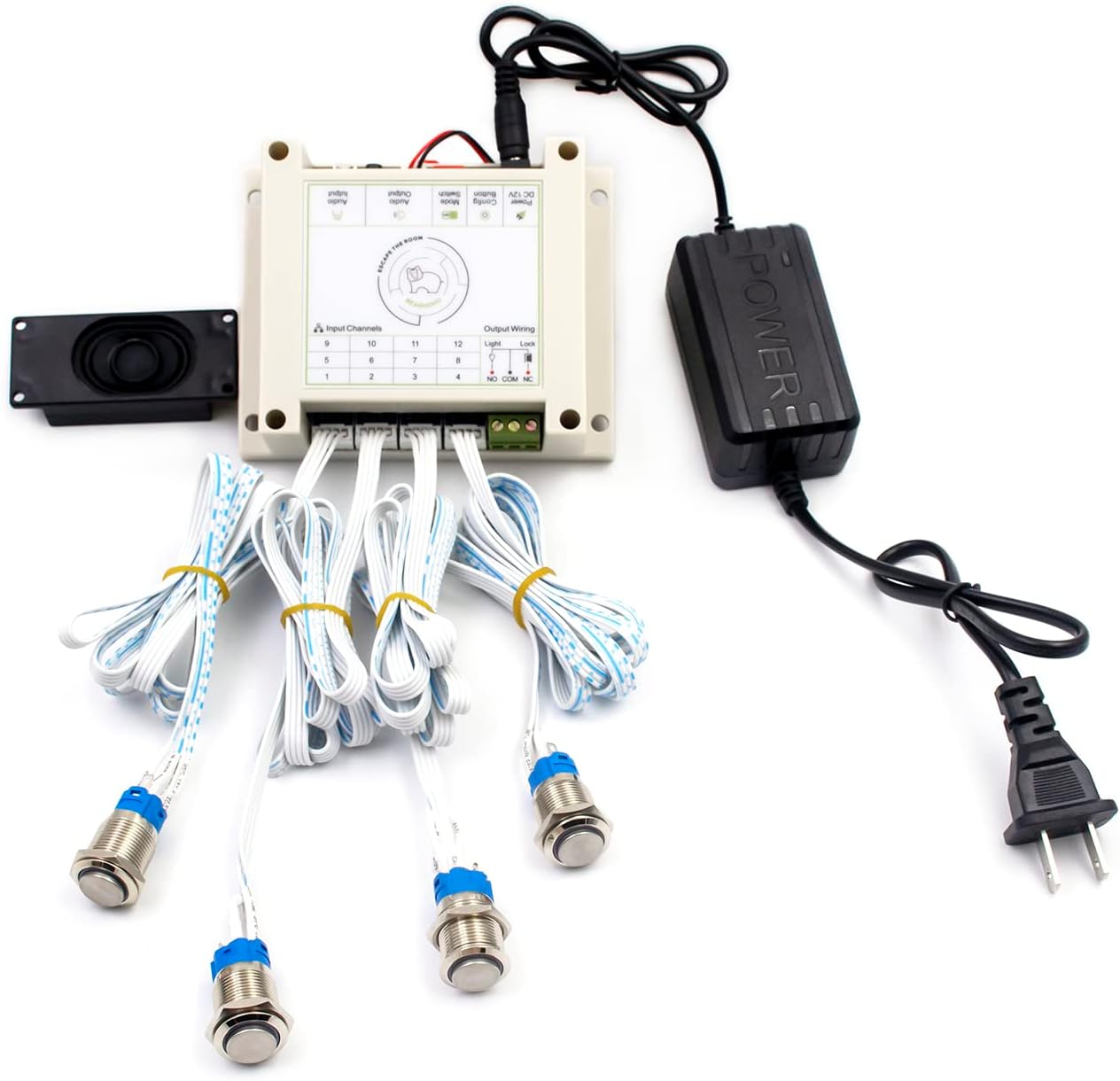
There is a controller connected with four metal buttons with audio. Room escape owners need to make some puzzle first, when adventures press these buttons in sequence or in the same time, the lock will release. Low working power, and easy to operate. PACKING LIST 1 x Controller (with or without Speaker) 4 x Metal Buttons (Color Lights) 1 x 12V Power Adapter 1 x USB Cable 1 x User Manual Tips: Props do NOT include electromagnetic locks, please provide your own. PLAYING MODE There are 2 kinds of playing modes in these props: Simultaneous mode and Sequence mode, it is easy to switch the playing modes by the settings switch. Step 1: There are 4 metal buttons could be found in the escape room. Step 2: Player need to press the metal buttons at one certain point of time(Simultaneous Mode) or one by one in the correct order (Sequence Mode), then the props will be triggered and the door lock will be opened. HOW TO RESET There are 3 ways to reset the props. Automatically reset mode: Waiting for 1 minute to automatically reset after successful trigger (There will be a buzzing sound when it reset). Real Time reset mode Sequence mode- After triggering successfully, press the metal buttons in the correct order again to reset. Simultaneous mode- Press the metal buttons in a certain time again to reset. Manual reset: Restart the controller to reset. MODIFY THE VOICE FILES 1. Insert the USB cable to the controller, and connect the controller to your PC. 2. Open the removable disk shows in the PC, backup all the original files in the controller. 3. Replace the original file with your favorite sound file, the path and the file name cannot be changed, the audio file format must be in MP3 format. 4. If you want to format the removable disk, please format it to FAT format only. Please do not format it to FAT32, exFAT or NTFS format.
- There are Simultaneous Version and Sequence Version two play modes, support owner change the game mode. In the Sequence Version Play Mode, owner can revise the trigger sequence by yourself, and it is easy to operate step by step refer to the manual.
- 4 DIFFERENT COLORS LIGHT. There are 4 colors of the metal buttons: red, yellow, blue, green, lights will be light up when it was pressed.
- CONTROL 12V ELECTRIC MAGNETIC TO UNLOCK. Connect 12V EM lock, The red wire of the EM lock should be connected to NC port of the controller. The black wire of the EM lock should be connected to COM port of the controller.
- There are 3 ways to reset, owner can choose the suitable reset method to set in advance.
- Support users to change audio content, audio format is MP3, no more than 16M.
| Size | 11 Metal Buttons |
|---|---|
| Color | With Audio |
| Manufacturer | Bearhoho |
| Item model number | DC-ERP008 |
| Product Dimensions | 3.94 x 3.94 x 1.57 inches |
| Included Components | 4 Colors Metal Buttons |


Bestseller ranking
Outdoor Fountains
Customers who viewed this product also viewed
Magnets & Magnetic Toys


Correction of product information
If you notice any omissions or errors in the product information on this page, please use the correction request form below.
Correction Request Form